www.devlib.net
Home  |   Products   |   Download   |   Purchase  |   Support  |   Affiliate
     
 
Products
DecryptSQL
DecryptAccess
GetDiskSerial DLL
TGetDiskSerial VCL
iTranslator
Miscellaneous
Clients
Contact us
Site Map
Links

DecryptSQL 2.9.2

DecryptSQL
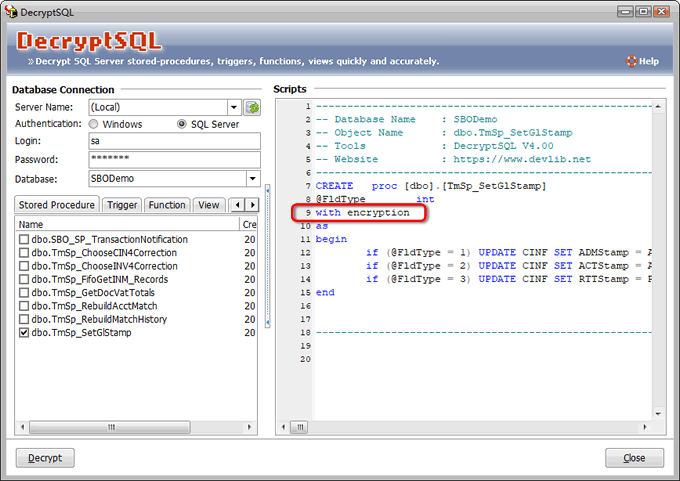
Do you have such kind experience that you can not view the complete SQL Script because of "WITH ENCRYPTION" when you view  the Stored Procedure, View, Trigger or Function of MS SQL2000 and MS SQL2005? If yes, the DecrypSQL can help you to view the complete SQL Script quickly and exactly. It is suitable for programmer & DBA.


Now feel the convenience of DecryptSQL!

"It has remained one of Download.com's popular database applications since its launch."


Key Features of DecryptSQL
  • Work in Microsoft™ SQL Server 2000 and 2005 and Microsoft™ Database Engine (MSDE).
  • Decrypt SQL Stored procedure, trigger, Function, View of ANY size.
  • Full T-SQL syntax highlighting for faster, easier reading.
  • Simple to decrypt - just click. Not require any knowledge of T-SQL or script.
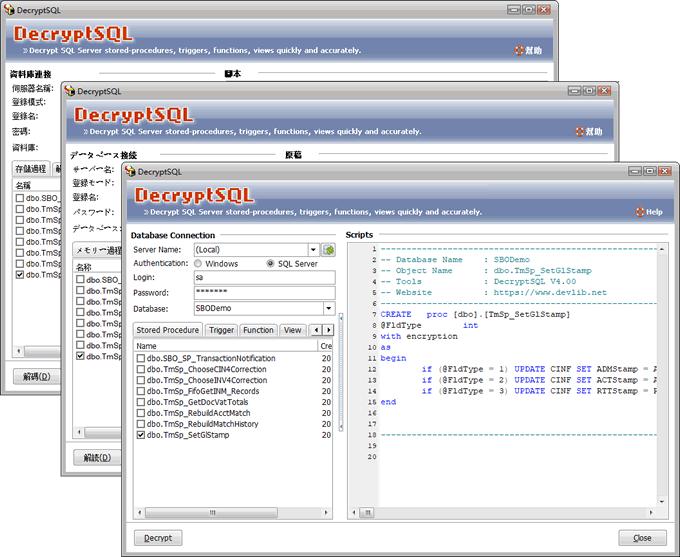
  • Support Multi-Language, Such as English, German, Chinese BIG5, Japanese and more.
  • Support the decrypt of the batch.
  • Export to HTML & RTF format.
System Requirements
  • Microsoft® Windows NT 4.0, Windows 2000, Windows XP or Windows Server 2003.
  • Pentium class 600MHz or higher processor.
  • 128MB of RAM.
  • 20MB free disk space
Screenshot
DecryptSQL
 
     
FAQ

Q: What type of database objects can be decrypted using DecryptSQL ?
A: Stored procedures, triggers, views, user defined functions, database triggers and server triggers can be decrypted.

Q: What SQL Server security permissions are necessary to decrypt with DecryptSQL ?
A:The user specified in the SQL Server's registration properties must belong to the sysadmin database roles.

Q: What is Microsoft SQL Server Native Client ?
A: Microsoft SQL Server Native Client (SQL Native Client) contains the SQL OLE DB provider and SQL ODBC driver in one native dynamic link library (DLL) supporting applications using native-code APIs (ODBC, OLE DB and ADO) to Microsoft SQL Server.

Q: What is Dedicated Administrator Connection (DAC) ?
A: With SQL Server 2005, Microsoft offers a new feature, the dedicated administrator connection. This configuration is intended to serve as a last means of defense to troubleshoot and kill the offending SQL Server processes as opposed to rebooting the server possibly causing database corruption and/or access violations. The DAC allows you to connect to the server and issue T-SQL commands to troubleshoot and correct the problem.

Q: Why "DAC Login Failed, MS SQL 2005 Connection Error." appear when connecting to SQL 2005 ?
A: If DecryptSQL can not login to your server and gives an error about DAC error than probably to your server is too restricted. You can read MS articles about how to enable DAC permanently or use our solution which enables this mode temporarily.

By default the DAC is only available from a client on the server. To enable remote clients to utilize the DAC an option needs to be set which can be done using sp_configure :
-------------------------------------------
sp_configure 'remote admin connections', 1;
GO

RECONFIGURE;
GO
-------------------------------------------

or by using the SQL Server Surface Area Configuration. To do this:
Launch the SQL Server Surface Area Configuration.tool which can be found under SQL Server 2005 Configuration Tools in the SQL Server 2005 menus.
Select "Surface Configuration Area for Features".
Check the box for "Enable remote DAC".
Select "Apply"

To SQL Server 2005 Express users:
Go to "Services" management view and open SQL Server service properties.
Stop the service, set option -T 7806 as shown on the picture below.
Start service from this dialog. It is important now to press Start right from here and now.
Close dialog.

As a result SQL Server will start with this option which enables DAC login mode. After the server restarted, option disabled.

If you can not find solution there, please, submit request to our support pages.

Awards and Ratings
DecryptSQL 2.5.0 - SOFTPEDIA "100% CLEAN" AWARD
DecryptSQL received a 5 stars award from CNET Download.com!
DecryptSQL received a 5 stars award from onekit.com
FileHungry
100% Clean and Safe to install award
DecryptSQL received a 5 stars award from SoftAll
100% Clean and Safe to install
5 stars award from rbytes.net
DecryptSQL received a 5 stars award from BrotherSoft
DecryptSQL on Core Download DownloadRage - Games and Free Software Downloads DecryptSQL awarded 4 Stars at the DownloadPipe Software Library
DecryptSQL download from fortedownloads.com DDA - Das Download Archiv  

 
Home   |   Products   |   Download   |   Purchase   |   Support  |   Affiliate
Copyright © 2002 - 2008 Devlib,Inc. All rights reserved.